CENTOS
#Adduser
useradd new
passwd new
usermod -aG wheel new
cp /etc/sudoers /root/sudoers.orig
visudo or vi /etc/sudoers
%wheel ALL=(ALL) ALL
tail -f /var/log/secure
การเปลี่ยน Server UAT to Production
#aaPanel
1. aaPanel - Console เพิ่ม Web DNS
ลบเชื่อเดิม


2. ลบ Cert
#WordPress

Set-ExecutionPolicy RemoteSigned
Install-Module PowershellGet -Force
Update-Module PowershellGet
ExchangeOnlineManagement
Install-Module -Name ExchangeOnlineManagement -Force -Scope AllUsers
Set-ItemProperty -Path 'HKLM:\SOFTWARE\Wow6432Node\Microsoft\.NETFramework\v4.0.30319' -Name 'SchUseStrongCrypto' -Type DWord -Value '1'
Import-Module ExchangeOnlineManagement
Get-Module ExchangeOnlineManagement
Connect-ExchangeOnline -Credential (Get-Credential) -ShowBanner:$False
Get-EXOMailbox | Format-table UserPrincipalName,DisplayName
Disconnect-ExchangeOnline -Confirm:$False
1. Edit file httpd-ssl.conf and config like a picture below
2. Insert line like a picture below

3. Copy ssl file to folder ssl

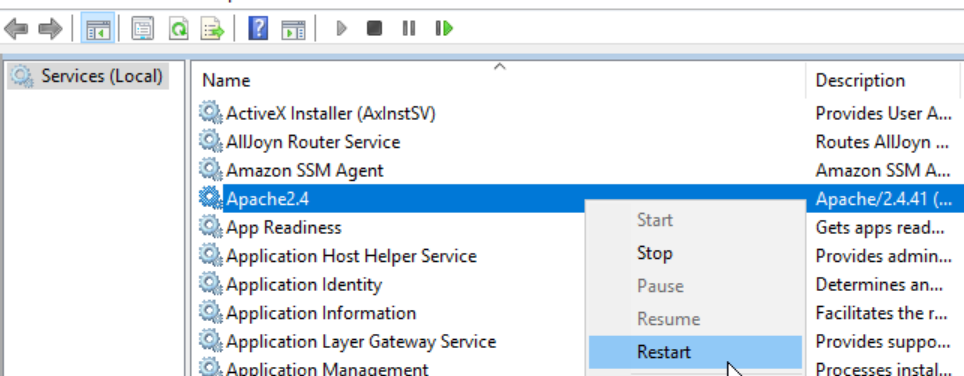
5. Run services.msc and restart apache2.4
1.Find apache ssl location

1. Click stop

2. Edit config
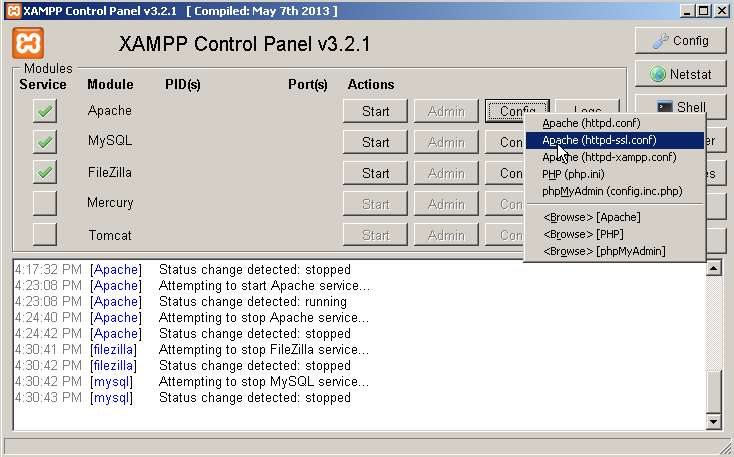
3. enable config

1. Run 'mmc'


6. K2
7. citibank-IR
1. Create the .pfx file using https://www.sslshopper.com/ssl-converter.html